
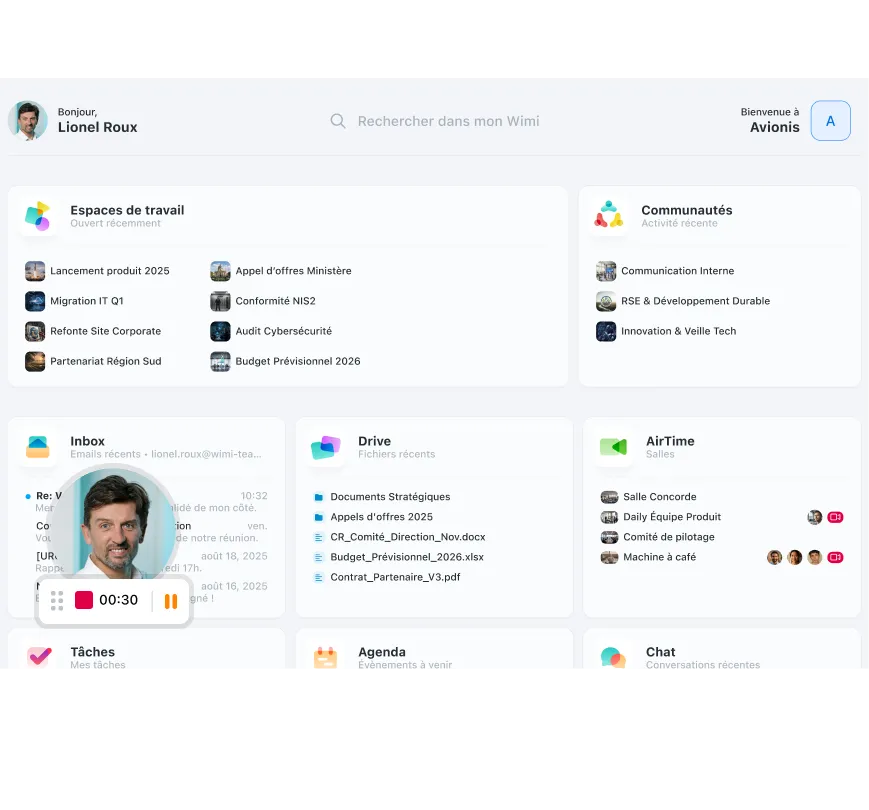








Capture your screen in one click, without installing software
Click “Record”, choose screen only or screen + camera, and start the capture. Everything works in your browser, no extensions to download.
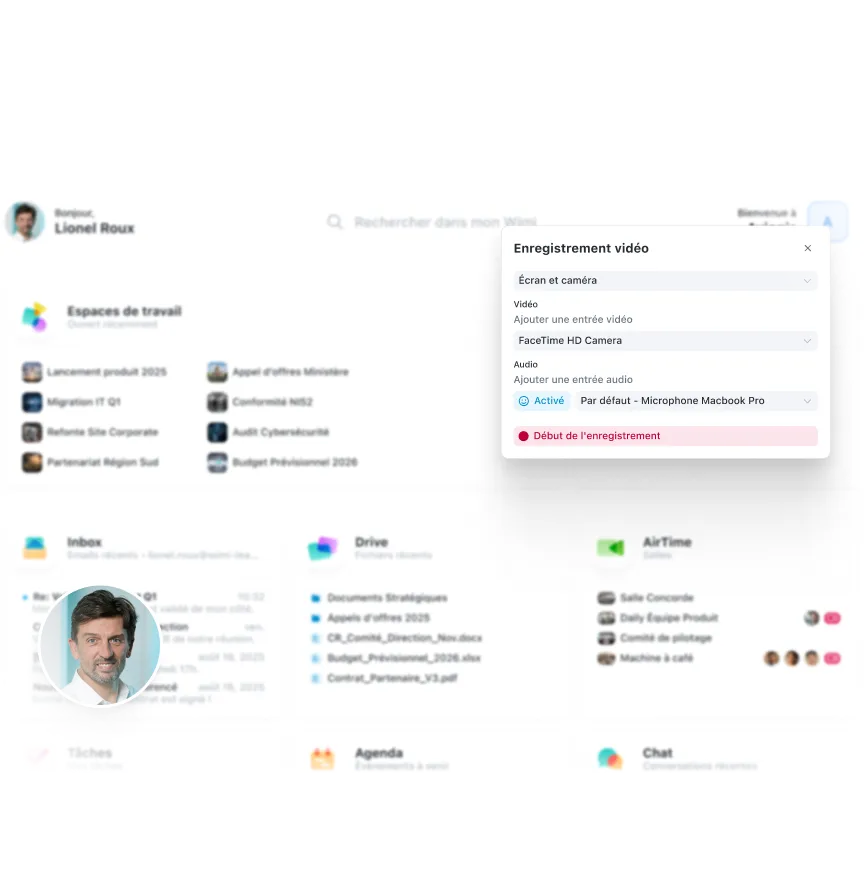

Upload your videos to conversations and communities instantly
Once the recording is complete, share directly in a Wimi conversation, channel or community. Your employees receive the video immediately without downloading or manipulating. You can also download locally or upload to Drive if needed.
“Wimi is a solution perfectly suited to collaboration in project mode. Its ease of handling and the flexibility offered according to uses convinced us. Covid-19 and the periods of teleworking have only amplified the need for such a solution to maintain exchanges and continue our projects.”Lorem ipsum dolor sit amet, consectetur adipiscing elit, sed do eiusmod tempor incididunt ut labore and dolore magna aliqua. Ut enim ad minimim veniam, qui nostrud exercising ullamco laboris nisi ut aliquip ex ea commodo consequat. Duvet high grain color wine In voluptate velit esse illum dolore eu fugiat nulla pariatur.


“Wimi is a solution perfectly suited to collaboration in project mode. Its ease of handling and the flexibility offered according to uses convinced us. Covid-19 and the periods of teleworking have only amplified the need for such a solution to maintain exchanges and continue our projects.”


"Wimi nous permet de centraliser notre processus de création et de planification de contenus. La plateforme nous apporte une vision claire et centralisée de notre production. Je le recommande sans hésiter aux équipes qui veulent gagner en agilité et optimiser leur processus de création de contenus."


"Wimi nous permet de faciliter la communication entre le staff et les joueurs, de fluidifier le partage des données et d’accélérer la planification de nos évènements sportifs. Le budget est aussi très attractif au regard du périmètre fonctionnel, riche et ergonome couvert par la solution."

"Wimi est un outil sécurisé et sécurisant qui répond clairement aux besoins d’une profession réglementée par le secret professionnel. Travailler sur nos dossiers depuis la plateforme est devenu une évidence pour nous. Nous sommes bluffés par la facilité avec laquelle nos clients et partenaires adoptent la solution."


A complete suite to manage your business

Integrate your recordings directly into the workspaces concerned. Tutorials, product demos and training courses instantly accessible by the entire project team.

Each recording is automatically saved in Wimi Drive, hosted in France. Organize your tutorials by project, version your demos and instantly find your captures.

During an AirTime meeting, enable recording in one click. Capture important presentations, decisions, and exchanges to share with those who are absent or review later.
Become an expert in team collaboration

Your questions about screen recording
How does the Wimi screen recording tool work?
Wimi screen recording is a simple tool that can be accessed in one click directly from your Wimi interface.The 3-step process:
1. Start recording:
- Click on the “Record” icon in Wimi
- Choose your capture mode:
- Screen only: Capture your screen only
- Screen + camera: Add your webcam as an overlay
- Select the window, tab, or entire screen to be recorded
2. Save your content:
- Click on “Start recording”
- Allow access to the microphone and camera in your browser
- Create your demo, tutorial or presentation
- Click “Stop” when finished
3. Automatic backup:
- The video is automatically saved in Wimi Drive
- Accommodation in France, zero manual manipulation
- Share it instantly in your workspaces
No installation required: Everything works in your browser, just like Wimi AirTime. No extensions, no third party software.
Discover Wimi Drive.
Can I record my Wimi AirTime meetings?
Yes, recording is also available during your airtime video conferences.How to record a meeting:
- Start your AirTime meeting normally
- Click on the “Save” button during the video
- The full meeting is captured: audio, video of all participants, screen sharing
- Stop recording whenever you want
Storage and sharing:
- The recording is automatically saved in Wimi Drive
- Share the replay with the absentees via a secure link
- Ideal for: strategic meetings, training, customer presentations, daily meetings
Participant notifications: When you start the recording, all participants are notified visually that they are registered (GDPR compliance) .Two complementary tools:
- Standalone screen recording: Tutorials, asynchronous product demos
- AirTime Recording: Meetings, Presentations, Live Trainings
Discover Wimi AirTime.
What is the difference between Wimi Enregistrement and Loom?
Wimi Enregistrement is distinguished by its native integration into a sovereign collaborative suite.Wimi Enregistrement vs Loom:Hosting and sovereignty:
- Wimi: Videos hosted in France, SecNumCloud infrastructure
- Loom: US hosting, subject to the Cloud Act
Full integration:
- Wimi: Native to the suite (Drive, Spaces, AirTime), unified workflow
- Loom: Isolated tool requiring exports/imports between platforms
Management and organization:
- Wimi: Videos in Drive with granular rights management, versioning, folders by project
- Loom: separate, less flexible video library
Pricing:
- Wimi: Included in your subscription, at no extra cost per video
- Loom: Strict limitations in the free version, paid per user
Use case for Wimi Enregistrement: Organizations wishing to centralize all their collaborative tools (video, documents, tasks, recordings) in a single sovereign suite, without multiplying subscriptions and the risks of data leaks.
Are there time or size limits for my recordings?
Recording limits depend on your Wimi package and your Drive storage capacity.Recording time:
- No hard time limit per video
- Recommendation: 10-15 minutes maximum for effective tutorials
- For long recordings (complete courses), choose several short videos
Size and storage:
- Videos consume your global Wimi Drive storage space
- Estimated: ~1 GB for 1 hour of video in standard quality
- If you reach your plan limit, you can upgrade or archive old videos
Formats and quality:
- Automatic export in MP4 format (compatible with all devices)
- Adaptive HD quality depending on your connection
- Audio and video synchronized automatically
Best practices:
- Short tutorials: 2-5 minutes per subject = better retention
- Product demos: 5-10 minutes with a clear plan
- Long courses: Cut into modules of 10-15 minutes
Contact your Wimi administrator to find out the storage capacity of your organization.
Where are my recorded videos stored?
All your screen recording videos are automatically stored in Wimi Drive, hosted in France. Sovereign and secure storage:
- Hosting France: Your videos are stored in our datacenters located in metropolitan France
- SecNumCloud: ANSSI qualified infrastructure SaaS 3.2
- Extraterritorial immunity: No access possible via the American Cloud Act
Organization and management:
- The videos appear in your personal Drive or in the workspace from which you started recording
- Organize them by folders like any file
- Access rights management: define who can see, download, or share your videos
- Automatic versioning if you re-record the same tutorial
No hidden storage limits: The capacity depends on your global Wimi package, no specific video quota.Difference vs Loom: Unlike Loom (US hosting), your product demo videos, internal tutorials, or sensitive processes remain under your total control and can never be viewed by a foreign authority.
Discover Wimi sovereignty.

Simplify your explanations with video
Try Wimi screen recording for free. One click to capture, automatic storage in France, instant sharing in your projects. Zero installation, zero complexity.