








Adapt visual protection to each situation
Confidential documents deserve an impressive red watermark. Internal drafts suffice with a discreet gray watermark. Your logo reinforces the owner's identity. Customize text, color, position, and opacity so that the message is always appropriate to the sensitivity level.
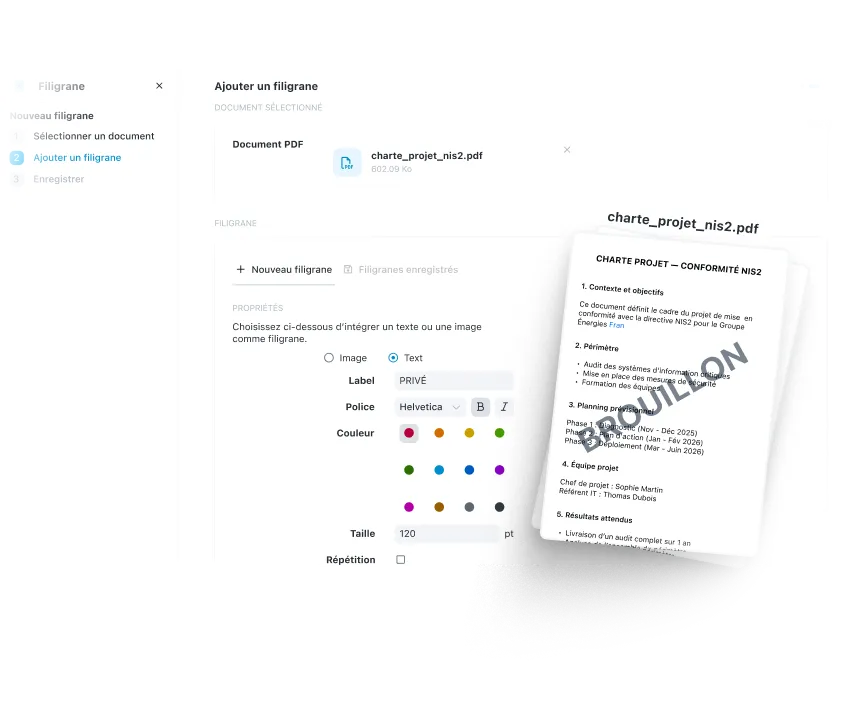

Validate the rendering before applying to your critical documents
A poorly positioned watermark hides important information. Too much opacity makes the document illegible. View each adjustment in real time and only apply when the result is professional. Your documents remain usable while being protected.
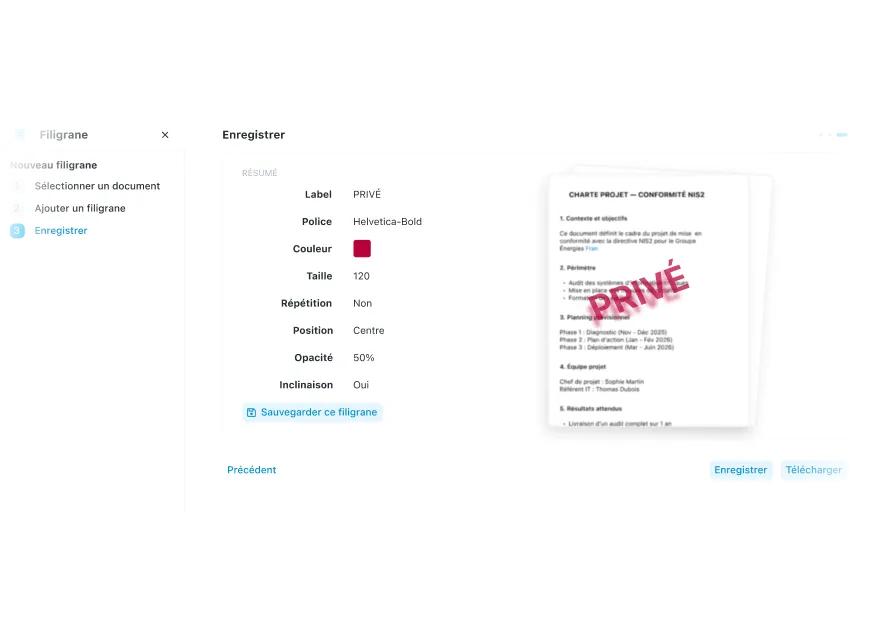

Save time on your recurring documents
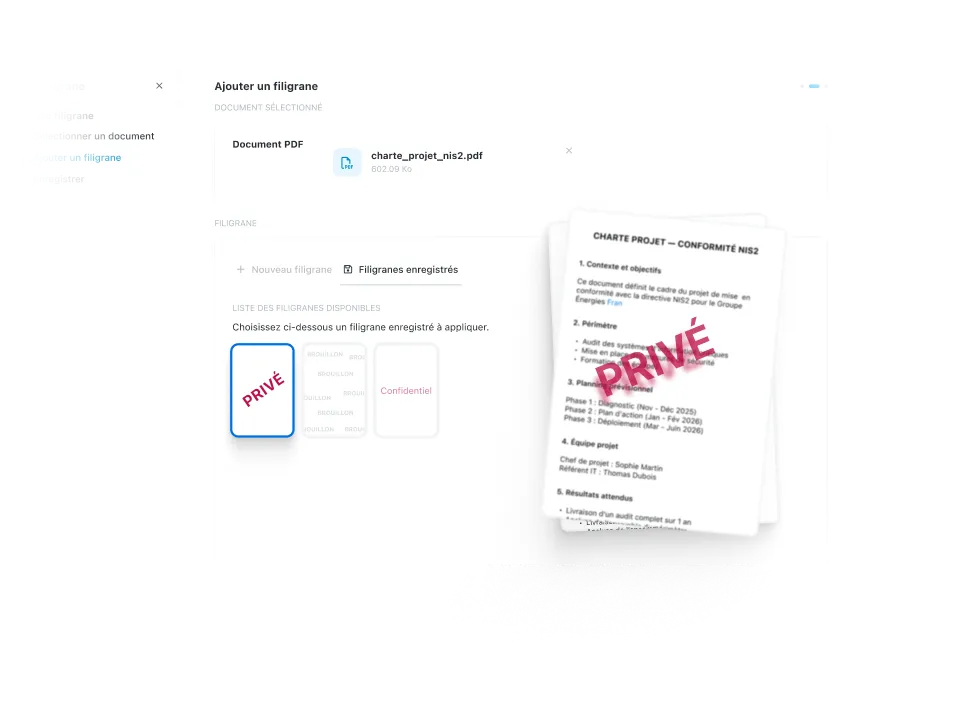
Create your standard watermarks once (CONFIDENTIAL red, gray DRAFT, company logo) once and reapply them in one click. All your contracts show the same watermark, all your internal reports too. Visual consistency guaranteed without reconfiguring each file.
“Wimi is a solution perfectly suited to collaboration in project mode. Its ease of handling and the flexibility offered according to uses convinced us. Covid-19 and the periods of teleworking have only amplified the need for such a solution to maintain exchanges and continue our projects.”Lorem ipsum dolor sit amet, consectetur adipiscing elit, sed do eiusmod tempor incididunt ut labore and dolore magna aliqua. Ut enim ad minimim veniam, qui nostrud exercising ullamco laboris nisi ut aliquip ex ea commodo consequat. Duvet high grain color wine In voluptate velit esse illum dolore eu fugiat nulla pariatur.


“Wimi is a solution perfectly suited to collaboration in project mode. Its ease of handling and the flexibility offered according to uses convinced us. Covid-19 and the periods of teleworking have only amplified the need for such a solution to maintain exchanges and continue our projects.”


"Wimi nous permet de centraliser notre processus de création et de planification de contenus. La plateforme nous apporte une vision claire et centralisée de notre production. Je le recommande sans hésiter aux équipes qui veulent gagner en agilité et optimiser leur processus de création de contenus."


"Wimi nous permet de faciliter la communication entre le staff et les joueurs, de fluidifier le partage des données et d’accélérer la planification de nos évènements sportifs. Le budget est aussi très attractif au regard du périmètre fonctionnel, riche et ergonome couvert par la solution."

"Wimi est un outil sécurisé et sécurisant qui répond clairement aux besoins d’une profession réglementée par le secret professionnel. Travailler sur nos dossiers depuis la plateforme est devenu une évidence pour nous. Nous sommes bluffés par la facilité avec laquelle nos clients et partenaires adoptent la solution."


A complete suite to manage your business

Set a default watermark for a sensitive workspace. All files added automatically inherit the watermark without manual action. Ideal for confidential projects, management committees or critical customer files.

Apply a watermark then store your documents in Wimi Drive. Hosting France, encryption at rest and granular access rights: your marked files remain protected at every stage. Visual protection is added to technical security.

Add a “CONFIDENTIAL” watermark to your contract, then start the electronic signature circuit directly from Wimi. Visible watermark + certified eIDAS signature: your sensitive documents are protected visually AND legally before distribution.
Become an information security expert

Your questions about the watermark
What is the difference between Watermark and Wimi Tattoo?
A Watermark is a visible watermark that you add to your documents to visually remind them of their sensitive nature. “CONFIDENTIAL” text in red, company logo, “DRAFT” mention: everyone sees the marking. It is a simple and fast deterrent protection.Wimi Tattoo is an invisible digital tattoo that precisely identifies who shared a document in the event of a leak. Forensic technology survives prints, scans, and manipulations. It is a technical protection for highly sensitive documents (OIV, defense, ministries) .In summary:
- Watermark = visible and dissuasive protection for all important documents
- Tattoo = invisible and forensic traceability for classified documents
You can combine the two: watermark visible recalls privacy + invisible tattoo traces leaks.
Learn how to manage your sensitive documents.
What types of files can I watermark?
Wimi Watermark works mainly on PDF documents. You upload your file, customize the watermark and download the watermarked version.
The watermark is applied permanently: once the PDF is generated, the watermark is an integral part of the document. Even if someone uploads or shares the file, the markup is still visible.
Does the watermark degrade the quality or readability of my documents?
No, if you adjust the opacity and position correctly. This is precisely the point of the real-time preview in Wimi Filigrane.Best practices:
- Opacity between 30% and 50%: visible without hiding the content
- Diagonal position: covers the document without blocking critical areas
- Appropriate size: big enough to be a deterrent, not too big to remain legible
You can see each setting before application. If the watermark hides important information or makes text unreadable, simply adjust the opacity or move the position until you find the perfect balance.
The documents remain fully usable while clearly displaying their confidential nature.
Can I automatically apply a watermark to all documents in a project?
Currently, the watermark is applied document by document via the dedicated interface.
You select a file, customize, or choose a predefined watermark from your library, then generate the watermarked version.
To save time on several identical documents, use the watermark library: create your “CONFIDENTIAL” watermark once with the right settings, save it, then reapply it in one click on each new file in the same project.
Tip: Clearly name your watermarks by project or sensitivity level (“Confidential Client X”, “Internal Draft”, “NDA Partners”) to quickly find the right watermark.
Can a watermark be removed once applied?
No, the watermark is permanently integrated into the generated PDF. That's exactly the point: once the document is marked, the watermark cannot be easily removed, even by someone trying to remove it with a PDF editor. If you need to change the watermark:
- Always keep the original file without watermarks
- Apply the watermark to a copy
- If you need another marking, start from the original file
Recommendation: Test your watermark on a draft document before applying it to your final files. Check opacity, position, color, and readability with the real-time preview. Once satisfied, apply it to your critical documents. This way you keep a clean original version and a watermarked version for external distribution or sensitive archiving.
Does the watermark have legal value in the event of a dispute?
The visible watermark is a sign of precaution that shows that you have taken steps to protect your sensitive documents. In the event of a dispute (unauthorized disclosure, NDA violation, unfair competition), the “CONFIDENTIAL” watermark proves that the recipient was aware of the sensitivity. However, the watermark alone does not identify who shared the document. To do this, you need Wimi Tattoo: the invisible digital tattoo that precisely traces the origin of the leak with recognized forensic value. In practice:
- Watermark = visual reminder + proof that you have secured the document
- Tattoo = forensic identification of the source of the leak
For your strategic documents (patents, sensitive contracts, R&D projects), we recommend the Watermark + Tattoo combination: visible deterrence + invisible traceability.

Protect your sensitive documents with a professional watermark
Apply a custom watermark in a few clicks. Discourage unauthorized sharing and visually mark the confidentiality of your important files.