How to set up a bug tracking system?

When developing a website, a new software or a new application, tracking and managing bugs is an essential and essential step. Because the bigger your team is, the more applications and software increases, and the more difficult it becomes to properly track customer and user feedback during development and/or during updates.
In order to guarantee the delivery of a quality and perfectly functioning product, and thus to ensure customer and user satisfaction, it is essential to use a monitoring tool that is as efficient as it is practical to quickly identify and deal with errors and malfunctions.
Why is it important to track bugs?
Bug management is an essential aspect in the development of computer software, but not only that. Indeed, regardless of your sector of activity and the project you are working on, it is unthinkable not to deal with and resolve errors and defects that may harm the proper functioning of the final product and/or hinder the customer and users.
Here are 5 reasons why it's important to have a bug tracking system in place.
- You ensure the quality of your product : by looking for errors and solving them, you improve the quality of your product, you guarantee its proper functioning and you reduce the risks of malfunctions.
- You maintain the reputation of your business : by delivering products that work flawlessly, your company gains an honorable reputation and your customers do not hesitate to recommend you. Conversely, a company that provides products with defects or bugs that need to be fixed ends up having a bad reputation and losing customers.
- You save time and money : by regularly tracking errors and bugs, and eliminating them as you go, you avoid an accumulation of problems that need more time to be resolved and that will keep your team engaged longer than necessary.
- Your customers are satisfied : by providing quality products that you are constantly improving, your customers will be satisfied and they will not hesitate to recommend your services. And that is priceless.
- You improve your processes : the implementation of a bug tracking method makes it possible to improve the quality of your products, but also the way your employees work. Indeed, bug tracking is also carried out in the way you work, making your processes more efficient and efficient, and your teams more productive.
5 tips for setting up a bug tracking system
Now that you've realized the value of a bug tracking system, follow these tips to set it up.
Focus on simplicity
When setting up a bug tracking system, it is essential that it be as simple as possible to use. If you choose a tool with complex functionalities, be sure that your collaborators will use it little or not at all, and that everyone will continue to do their own thing, thus allowing errors and bugs to pass. Because no one has the time or the desire to try to understand how to report a bug and fix it.
Therefore, choose a system that is simple to understand and easy to implement for all of your employees.
Focus on customer satisfaction
At work, it can be difficult to know which (s) task (s) carry out first: the development of a new feature, the correction of a malfunction, the improvement of the product, etc. In addition, each collaboration has its own opinion on the subject.
To avoid having your team members spend too much time fixing bugs rather than developing new functions, it's imperative to prioritize. And to know what to prioritize, make sure your bug management system focuses primarily on improving the customer experience.
By putting the customer at the center of attention, you and your team will immediately know which mistakes to fix first. Do not hesitate to use feedback from the customer and/or users to guide you.
Define a standard process
In order to effectively manage all the bugs and errors that you and your team are facing, it is essential to have a standard process in place that all members of your team will have to follow.
Here is an example.
- An employee identifies a bug.
- It reports it by entering it into the tracking system.
- The bug is assigned to a developer who is in charge of resolving it.
- Another developer is responsible for testing the feature to make sure the bug is gone.
- The bug is considered resolved and archived.
Throughout its journey through the tracking system, the bug is assigned a person responsible for its resolution and a status that keeps the team informed of its evolution. Examples of statuses: detected, in process, test in progress, pending, resolved, etc.
Set up a notification system
To ensure the effectiveness of your bug tracking system, consider setting up a notification system so that the people concerned receive an email as soon as a bug changes status. This way, the right people will automatically be notified of changes in the situation.
Test and improve
Few systems or processes are perfect from the start. In the same way that you test each new feature of your software before integrating them, you must test your bug tracking system and improve it as you receive comments and ideas from your collaborators. So, you will end up with a powerful tool that works perfectly for your entire business.
Conclusion
When developing a website, application or software, monitoring and dealing with malfunctions is often one of the most time-consuming and time-consuming activities. By following these tips, you'll set up an effective bug tracking system that will save the entire team time.
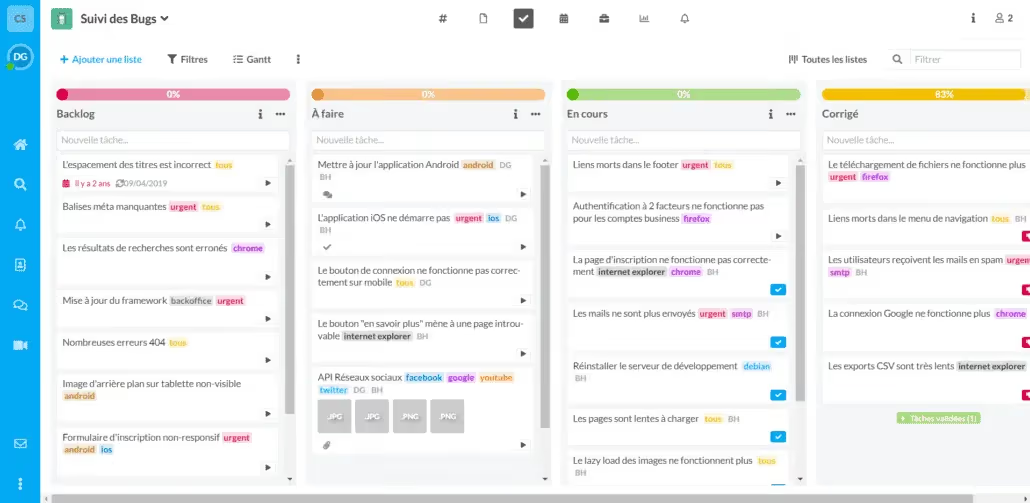
Now that you have all the keys in hand, all you have to do is get started! To help you, you can rely on this model, created thanks to the task management tool on the Wimi platform.