
Kanban online
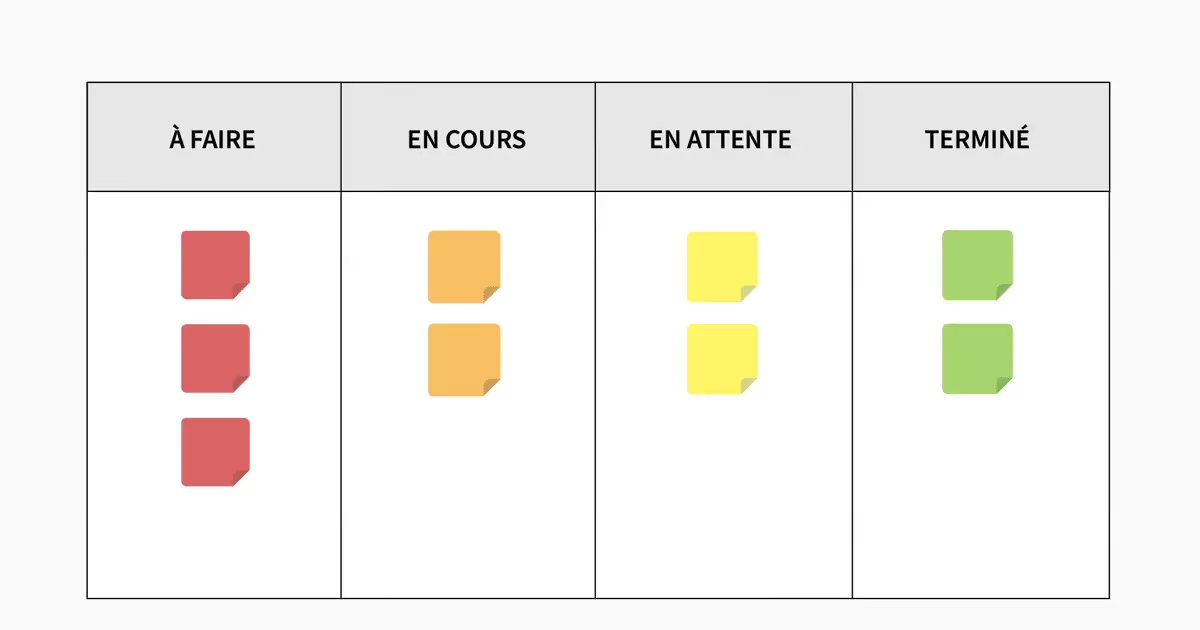
What is a Kanban board?
A Kanban board is a visualization tool that optimizes the workflow and optimizes the overall organization of businesses. Using the Kanban method to manage the work of your teams allows you to:
- Promote concentration
- Boosting productivity
- Increase visibility
Details are visually centralized on a Kanban board, which minimizes the time spent following up on progress reports or meetings.
The goal of a Kanban system is to limit the amount of work in progress so that the work flowing through the system matches its capacity. In other words, a system can only handle a limited amount of traffic while allowing that traffic to move smoothly through the stages of the process.
A more advanced Kanban board may also include information to help actively manage how work is done on the board, such as process policies.
Getting started with Kanban doesn't require an organization-wide overhaul; it can start with a single team looking to improve visibility and take control of their workflow and grow from there.
What does a Kanban schedule consist of?
- Routes and subways, which represent defined steps in the process
- Maps, which represent the work items that move through the process
Using sub-channels on a Kanban board allows you to more accurately reflect your process digitally. By simply defining your process steps in lanes and documenting your work items with maps, you can start enjoying the benefits of Kanban.
Channels on a Kanban board
Pathways represent the steps in your process. Each vertical path should reflect a distinct stage in your process and move sequentially from left to right: from the “To Do” state, to the “In progress” state, to the “Completed” state.
Horizontal corridors can be used to represent processes that take place simultaneously within an organization.
For example, if a sales team follows the same process for each of its geographic territories, they can set up vertical corridors with each of the stages of their process, and horizontal corridors for each of the territories for which they are responsible. This would allow the team to manage and refine their process on a shared board while distinguishing the areas in which they work.
Kanban cards
On each card on your Kanban board, you include details that will make it easy for everyone on the board to understand the key details of this work, such as:
- Title — what is this work item?
- Map assignment - who is working on this work item?
- Card type - what type of work is this? (Generally referred to by color)
- Due date — is there a due date set for this work item?
As well as more detailed information about the job, such as:
- Map description - what exactly is involved in this work item? What is the desired end result?
- Attachments/files — are there any documents, links, or visuals that are helpful in completing this work item?
- Feedback history - what the team added
- Map history
Kanban cards allow easy access to key information about specific work items on your Kanban board.
Managing Workflow with a Kanban Board
Process policies are rules or guidelines that the team using a Kanban board develops to help the team use the board consistently. An example of a process policy could be: “Maps should be accompanied by a summary of the completed project before moving from “To Do” to “In Progress.”
WIP (work in process) limits are limits set on the number of work items that can be in a particular lane or set of lanes at a given time. Based on the Kanban concept that we can act more quickly when we focus on fewer items at once, WIP limits help teams avoid overloading the system by working on too many things at once.
The different typical benefits of Kanban
When you market physical products on an assembly line, you can see the process and production steps taking place right in front of your eyes. If there is a bottleneck in one part of the system, you can immediately see the work piling up and know where to go to fix the problem.
But if your work is less tangible—developing software, creating marketing campaigns, or building a product roadmap—your process is likely to be less obvious. Bottlenecks aren't that apparent and teams struggle to manage capacity, which often results in overwhelmed team members.
Using the Kanban method to manage the work of users on your teams means defining all the steps in your process and actively monitoring the work throughout this process. Kanban software is flexible and customizable, allowing you to adjust your board design as your process evolves. In this sense, there are endless types of Kanban boards, as each one is unique depending on the organization that uses it.
Take advantage of the full potential of the agile method with a Kanban board (or Kanban tool)
Wimi's intuitive and unlimited workspace (among other things) allows you to manage the workflow of your entire team, from assigning tasks to organizing team sprint meetings in the office or remotely. With our collaboration tools, you can take control of your team's communication and productivity to ensure that your project is completed on time and in an optimal manner.
Facilitate planning and collaboration within your teams thanks to the Kanban method
Give your employees the means to develop their full potential. Thanks to Wimi, you will be able to share your Kanban tool, which will allow users of the tool to express their opinions, their new ideas and change the status of tasks.
Through real-time updates, each employee can draw the attention of other team members to the points they need and get instant feedback.
Use mentions, built-in chat, and emoji reactions to optimize your internal communication, no matter how far away you are.
How do I create a kanban board?
Brainstorming, define your needs, your stages, your key moments, the roles of each user, etc...
Select your tool to create the table. You can use a physical board or a digital tool to welcome team members who are working remotely.
Divide all tasks in three corridor columns under the tags “to do”, “in progress” and “completed”.
Organize your tasks in the “to do” column in order of priority. You can move your highest priority task to the “in progress” column once you've started working on it.
Define a clear limit for the WIP. It refers to the limit on the number of tasks that can be in the current column of the Kanban board at any given time. This ensures teams are working to their full potential without multitasking.
Add maps. You can add maps based on the priority and timeline of a task or project. A card should only represent one item. If the scope of the map seems too broad, split it into multiple maps.
Define expectations. Specify who has the authority to add, reorder, delete, or move Kanban cards. Limit the number of people who can do this to avoid creating confusion.
Gather feedback. Gather feedback and suggestions from stakeholders and make adjustments to your Kanban board to better meet the needs of your team and organization.
Track progress using kanban software. Track the progress of the work of team members at a company level, by categorizing items in the appropriate column or using labels that group each item according to its status.
What are the best kanban software?
Is there free software to create kanban schedules?
Depending on the number of users, there are many Kanban programs that are free or available in a free version. Here is a non-exhaustive list of Kanban solutions that are available for free:
- Trello (free version available)
- Asana (free for up to 15 users)
- monday.com (free for up to 2 users)
- Clickup (available in a free version) (Monday tool)
- Notion (free up to 50 documents)
- Miro (free up to 3 paintings)
- Kanbanize (from 15 users)
- KanbanFlow (no user limit in the free version)
- Zoho Projects (free for up to 3 users)
- Meistertask (free version available)
- Jira (free for up to 10 users)
- Wimi (free trial)
All these similar solutions are different on specific points to each appeal to different companies.
For example, prices vary enormously depending on the solution chosen and its functionalities. Meistertask and Kanbanflow cost 4-5€/user/month, Jira between 7 and 15€/user/month while Kanbanize costs just over 100€/user/month. It is simply because the functionalities and the performance of these tools are different. You will then have to compare or try the different solutions such as Jira, Kanban Flow, Meistertask, Kanbanize and all the others.
It's up to you to compare these tools and especially to check that your needs will be well met in the free versions. Depending on the size of your organization, the number of users, and the nature of your business, it's likely that a free solution won't be able to satisfy you. You will then have to look at the paid versions of these or to Wimi, the extremely complete all-in-one software.
In addition video conferencing and document sharing features (roughly Microsoft Teams and Google Drive). In the same style as Monday, Wimi is a very complete collaborative tool with various functionalities including the Kanban tool or the Gantt chart.
Trello, Asana, what are the differences between these tools?
Asana and Trello are two companies that have developed project management tools for businesses that work collaboratively and in an agile manner.
What are the differences between these two tools?
Trello is a powerful kanban tool and one of the first of its kind. Trello has democratized kanban scheduling software in order to provide businesses with a simple and effective task management solution.
Asana is a famous project management software which offers a very advanced feature for creating kanban boards for personal or professional use.
The main functional difference between Trello and Asana is the way in which tasks are displayed and how to order and categorize tasks. Asana is much better suited to a project with thirty tasks, while Trello is specialized for smaller projects. However, a list of tasks, sub-tasks and the fact of grouping them together is essential for project management and therefore Trello is very limiting.
In their free version, Asana offers more features than Trello. Even if a catalog of applications reinforces the range of functionalities of Trello in premium version, Asana remains more efficient for implementing a project.


